Portfolio Alerts and Price Notifications
Set alerts for price levels and percentage moves on the holdings you follow, in either direction. Triggered alerts reach you by email, browser push, SMS, or webhook.
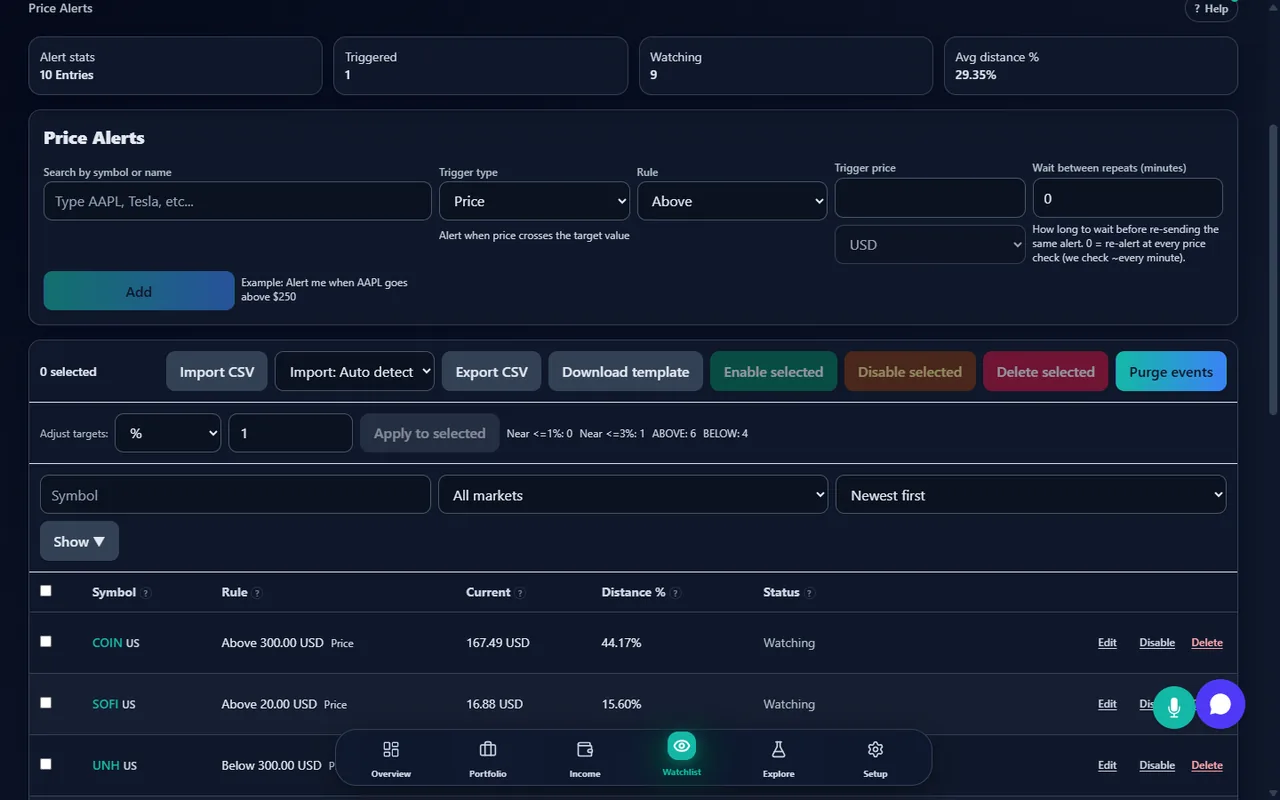
Price Target Alerts
Set alerts when a stock reaches a specific price — above or below your target. Get notified as soon as the condition is met during market hours so you can evaluate your next move.
Percentage Move Alerts
Be notified when a holding moves by more than a percentage you choose on the day, up or down. That is a different question from an absolute price level, and one a fixed price target cannot express — a 5% move matters whatever the share price happens to be.
Every Trigger Recorded as an Event
Each firing is stored with the value that caused it and the time it happened, so you can see what the price actually was when the condition was met. Acknowledge events one at a time or all at once, filter the history, export it to CSV, and purge what you no longer need.
Triggered Alerts Appear Immediately
When the monitor records a trigger, the event is pushed straight to your open browser session over a live server-sent event connection. It appears without a refresh and without the page polling for it.
Cooldowns and Bulk Management
Each alert carries a cooldown so a price hovering at your threshold does not produce a stream of duplicates. Alerts can be created, enabled, disabled, retargeted, and deleted in bulk, and the whole set exported to CSV or imported from one.
Choose How You Are Notified
Decide where each alert goes: email, a browser push notification, an SMS message, or a webhook into a system of your own. Triggered alerts also appear in the app itself, so nothing depends on a single channel.
How it works
Set the condition
Pick a symbol, choose the trigger — a price level or a percentage move — and set the threshold and whether it fires above or below. Two further trigger types, drawdown and volume, appear in the form but are not evaluated in the current deployment; see the limits below. How many alerts you can keep active at once depends on your plan.
The monitor checks your conditions on a schedule
A background service re-evaluates every enabled alert on a repeating cycle using recently cached quotes, rather than watching a live tick stream. It skips markets that are closed, and it will not fire the same alert again while its cooldown is running.
Delivery goes where you told it to
Each notification channel is set up once and reused. Email works out of the box; browser push, SMS and webhooks each need their own one-time setup, and a webhook destination is checked before it is accepted so an alert cannot be pointed at an internal address.
Review, acknowledge, and tidy up
Every trigger is recorded as an event with the value that caused it. Acknowledge events one at a time or all at once, filter the history, export it to CSV, and purge what you no longer need.
What it does not do
Knowing where a tool stops is worth more than a longer list of what it claims. These are the boundaries of what StockWatcher does here.
It is not a live tick feed
Conditions are evaluated on a repeating cycle against cached quotes, not continuously against a streaming market feed. A price that touches your level and reverses between two checks will not produce an alert.
Only two trigger types actually fire
The alert form offers four trigger types, but drawdown and volume alerts are switched off in the current deployment and are not evaluated — they will not fire, so do not rely on them. Price level and percentage move are the two that work, in one direction, on one symbol. There is no rule builder that combines several conditions, and there is no trigger on total portfolio value, on profit and loss, or on a dividend announcement.
Alerts are not trading signals, and delivery is not assured
An alert reports that a condition you set was met against market data that may be delayed or estimated. Delivery depends on your network, your mail provider, and your browser's notification permissions. Do not build anything time-critical around it.
No mobile app notifications
Push notifications work through your browser's own notification support. There is no native mobile application, and nothing is delivered through Apple's or Google's mobile push services.
Related Resources
Start monitoring the holdings you follow
Available on all plans. Free 14-day Pro trial included.
Explore plansAlerts are based on market data that may be delayed or estimated. Alert delivery depends on network connectivity and market data availability. Alerts are for informational purposes only and do not constitute trading signals or investment advice. Always verify conditions with your brokerage before taking action.